Noting this here for my own reference, and any other lemmy server admins that don't happen to be database administrators by day 🙂
I am not a DBA, if I'm doing something bad/incorrect here... please post! Yes, I've reset the password and TOTP token on the example account below.
2FA flags are stored in the local_user table, however that does not show usernames. To find the person_id for the user account you want to disable 2FA for, you'll need to check the person table. I'll use my test account here as an example:
SELECT * from person where name = 'guineapig' and local = 't';
Giving:
Note the number 781227, this is the person_id for this account on my instance. To confirm: SELECT * from local_user where person_id = '781227';
Yep, the 2FA string has the expected username in it. Now to disable 2FA on the account we need to NULL out both totp_2fa_url and totp_2fa_secret rows:
UPDATE local_user
SET totp_2fa_url = NULL
WHERE person_id = 781227;
UPDATE local_user
SET totp_2fa_secret = NULL
WHERE person_id = 781227;
Should give output like this:
And checking the local_user table again, both TOTP fields should be empty:
𝚝𝚛𝚔 - 2.4yr
2
Lodion 🇦🇺 - 2.4yr
1
Lodion 🇦🇺 - 2.4yr
Aww no gifs in jerboa
4
𝚐𝚕𝚘𝚠𝚒𝚎 - 2.0yr
Thanks so much for this! It saved me, as I got locked out by accidentally disabling 2fa and then re-enabling it from account settings, which seemed to nuke the original settings.
Speaking of which, it no longer offers me a setup link as once before. So, I cannot set up 2fa again. Unless you might know a way? Thanks
1
czan - 2.4yr
If you wanted to do it in one query I think you could do something like
UPDATE local_user AS u
  SET u.totp_2fa_url = null,
      u.totp_2fa_secret = null
 FROM person AS p
WHERE p.id = u.person_id
  AND p.local
  AND p.name = 'guineapig';
I assume the p.local is optional, too, because the id match against the local_user table will presumably limit it to only local users. 🤷
lodion in meta
Disabling 2FA on lemmy DB
Noting this here for my own reference, and any other lemmy server admins that don't happen to be database administrators by day 🙂
I am not a DBA, if I'm doing something bad/incorrect here... please post! Yes, I've reset the password and TOTP token on the example account below.
2FA flags are stored in the
local_usertable, however that does not show usernames. To find theperson_idfor the user account you want to disable 2FA for, you'll need to check thepersontable. I'll use my test account here as an example:SELECT * from person where name = 'guineapig' and local = 't';Giving:
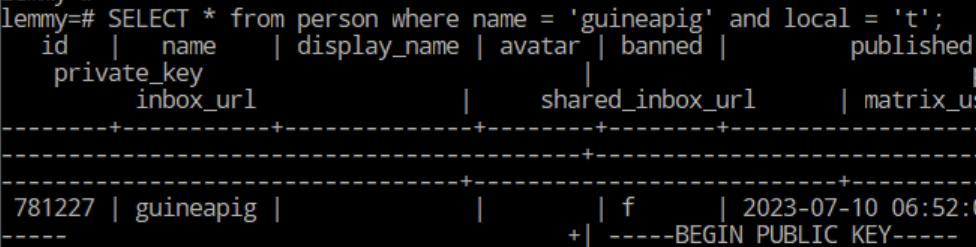
Note the number 781227, this is the
person_idfor this account on my instance. To confirm:SELECT * from local_user where person_id = '781227';Yep, the 2FA string has the expected username in it. Now to disable 2FA on the account we need to NULL out both
totp_2fa_urlandtotp_2fa_secretrows:Should give output like this:
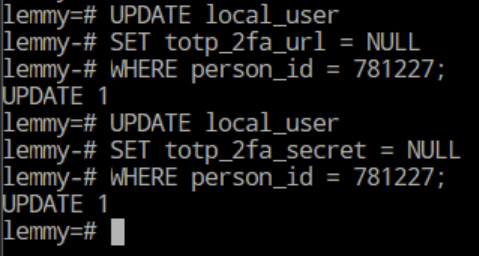
And checking the
local_usertable again, both TOTP fields should be empty:Aww no gifs in jerboa
Thanks so much for this! It saved me, as I got locked out by accidentally disabling 2fa and then re-enabling it from account settings, which seemed to nuke the original settings.
Speaking of which, it no longer offers me a setup link as once before. So, I cannot set up 2fa again. Unless you might know a way? Thanks
If you wanted to do it in one query I think you could do something like
I assume the
p.localis optional, too, because the id match against thelocal_usertable will presumably limit it to only local users. 🤷Thanks, good to know.